 Lemon wiki
Lemon Trio
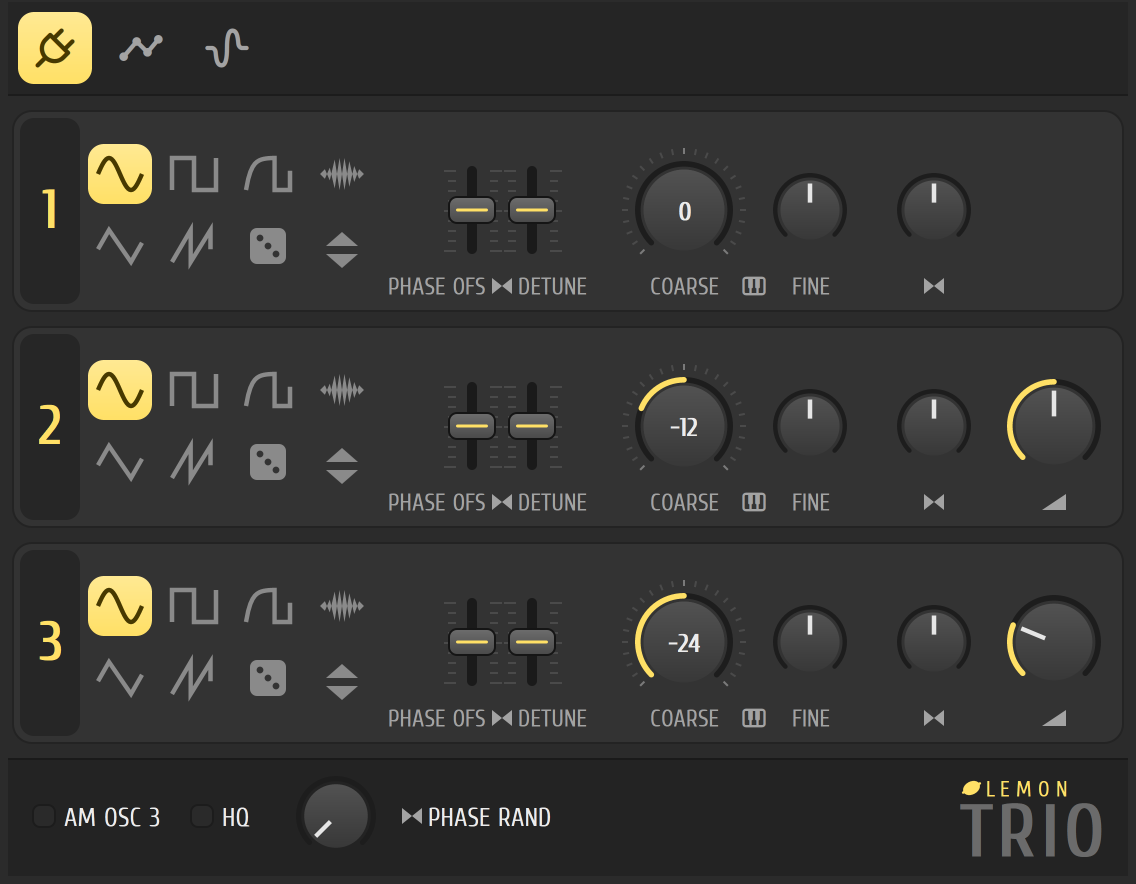
Lemon Trio is a straightforward synth: three oscillators you mix together. It’s a good first stop for basses, leads and simple pads, because everything it does is in front of you on one page.
It’s built into Lemon Studio, and also comes as a VST3 and CLAP plugin for other DAWs.
Get a sound quickly
Section titled “Get a sound quickly”- Press F8 for the plugin palette and click Lemon Trio. It joins the instrument rack: click its name there to open it.
- Play some notes with your computer keyboard. It’s on by default, and Ctrl+T switches it off and on.
- On card 1, click a shape: sine for something soft, saw for something bright.
- Pick a different shape on card 2, and turn its COARSE knob to -12 to add an octave below.
- Use card 2’s and 3’s mix knobs to bring them in.
The cards
Section titled “The cards”Each oscillator has its own card with the same controls.
| Control | What it does |
|---|---|
| Shapes | Sine, triangle, square, saw, rounded saw and noise, plus a custom shape that plays a sample as one cycle of the wave. The invert button flips the wave upside down |
| PHASE OFS and DETUNE | Two faders that move the right side of the oscillator away from the left, in phase and in tuning, for a wider sound |
| COARSE | Tuning in semitones |
| FINE | Tuning in small steps, for thickening a sound |
| Pan | Where the oscillator sits in the stereo image |
| Mix | How much of oscillators 2 and 3 is blended in. Oscillator 1 has no mix knob |
Along the bottom
Section titled “Along the bottom”- AM OSC 3 makes oscillator 3 change the volume of oscillators 1 and 2 instead of being heard on its own. Its mix knob then sets how deep the effect is.
- HQ switches to anti-aliased oscillators, so bright shapes such as saw and square sound cleaner on high notes.
- PHASE RAND starts the left and right sides of each oscillator at random points in the wave on every note, so repeated notes sound less mechanical and a little wider.
The other pages
Section titled “The other pages”Use the tabs at the top of the window:
- Envelopes, LFOs and filter: an envelope and an LFO for each of panning, volume, the filter’s two controls (cutoff and resonance) and pitch, plus a filter with a choice of types. The panning LFO is greyed out.
- Custom shape sample: the sample behind the custom shape. Choosing the custom shape opens a file dialog, and clicking the page loads a different sample.
- For a fat bass, use two saws, detuned slightly with FINE and spread with the detune fader.
- Put Lemon Filter or Pulp Filter on its mixer track if you want more movement.
- Presets are in the window’s title bar, and you can save your own there.
Related
Section titled “Related”- Instrument rack
- Piano roll
- Citrus, for more complex synthesis