 Lemon wiki
Lemon Filter
Lemon Filter takes away the highs or the lows of a sound, or sharpens a band around a frequency. It’s the classic sweep for synths, drums and risers. A graph under the knobs draws the filter’s response as you turn them.
It’s built into Lemon Studio, and also comes as a VST3 and CLAP plugin for other DAWs.
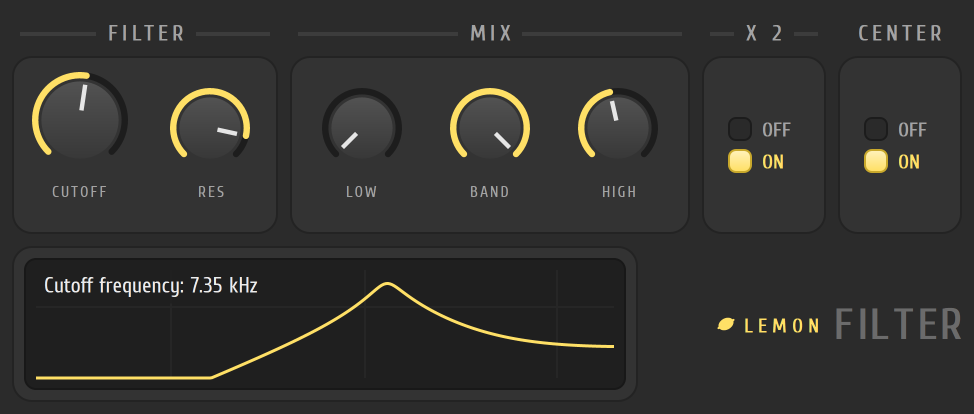
A low-pass sweep
Section titled “A low-pass sweep”- Put Lemon Filter in an effect slot on the track in the mixer.
- In the MIX card, turn LOW all the way up and BAND and HIGH all the way down. This gives a low-pass filter.
- Turn CUTOFF down and listen to the highs disappear. The graph shows the curve.
- Raise RES to add a peak at the cutoff.
- Automate CUTOFF and draw the sweep.
The controls
Section titled “The controls”| Control | What it does |
|---|---|
| CUTOFF | The frequency the filter works around |
| RES | Resonance: the peak at the cutoff |
| LOW, BAND, HIGH | How much of each output is mixed in. All three together make different shapes: a notch, for example, comes from mixing low and high |
| X 2 | Adds a second filter stage for a steeper slope |
| CENTER | Removes any constant offset from the signal. It’s on by default |
- Set BAND only, with high RES, for a wah-like voice.
- With LOW and HIGH both up and BAND down, the filter cuts a notch around CUTOFF.
Related
Section titled “Related”- Mixer
- Automation
- Pulp Filter, for patterns of filter movement
- Lemon Parametric EQ
- Plugins