 Lemon wiki
Lemon Peak Controller
Lemon Peak Controller makes no sound of its own. It watches how loud the sound reaching it is, runs an LFO, and turns both into control values that can move other controls: a volume fader, a pan knob, a filter cutoff. Its best-known use is sidechain pumping, where the kick makes a bass duck. It’s built into Lemon Studio and also comes as a VST3 and CLAP plugin for other DAWs.
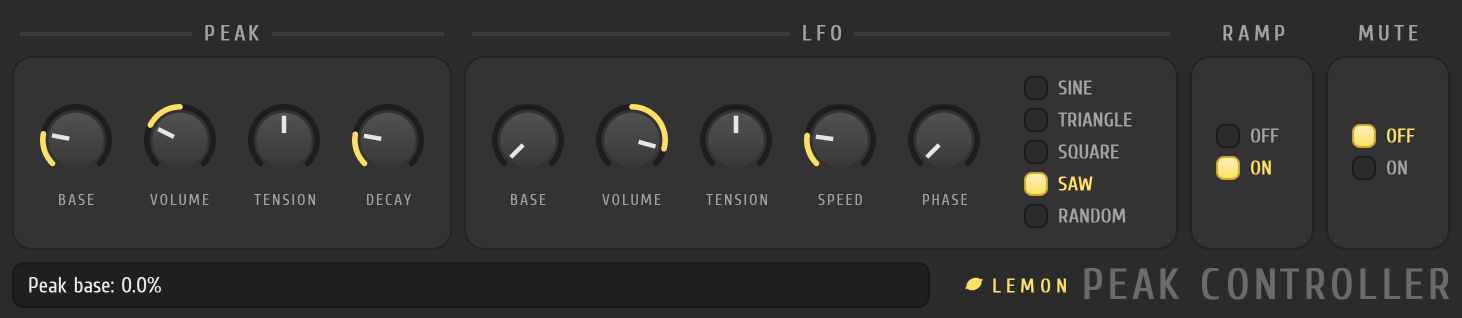
Get a control moving
Section titled “Get a control moving”- Put Lemon Peak Controller in an effect slot on the mixer track whose level you want to follow, such as the kick’s track.
- Play the song. The sound goes through the plugin, and the PEAK card follows its level.
- Turn MUTE on if you don’t want to hear that track through the controller’s slot.
- Link one of its outputs to the control you want it to move. Making a new link in the app isn’t available yet; see Good to know.
The plugin puts out three values: the peak on its own, the LFO on its own, and the peak and LFO added together. A link uses one of them.
The peak card
Section titled “The peak card”- BASE is the value the output rests at, with no sound. The peak is added to it.
- VOLUME sets how far a loud sound pushes the output. A negative value flips it, so a loud sound pulls the output down.
- TENSION bends the response curve.
- DECAY sets how quickly the output falls back after a loud moment. A short decay follows the sound tightly, and a long one lets it settle slowly.
The LFO card
Section titled “The LFO card”The LFO has its own BASE, VOLUME and TENSION, a SPEED (shown as a length in beats, so it stays in time with the song), a PHASE, and a shape: SINE, TRIANGLE, SQUARE, SAW or RANDOM.
A sidechain pumping recipe
Section titled “A sidechain pumping recipe”This is the setup. Today it applies to links that arrive with an opened project, and to other DAWs that can map the outputs.
- Put the controller on the kick’s mixer track and switch MUTE on.
- Turn the peak BASE up high and set the peak VOLUME to a negative value. The output then rests high, and every kick pulls it down.
- Set DECAY to taste. Short decays give a tight duck, and longer ones a slow, breathing pump.
- Link the peak output to the volume of the bass’s track, or to a pad’s.
- Play the song. Each kick now pulls the bass down and lets it come back up.
Good to know
Section titled “Good to know”- The values are worked out once for every tick of the song, 96 to a beat.
- In Lemon Studio, links that come with an opened project work. Making or editing a link inside the app isn’t there yet.
- In other DAWs, the three outputs leave the plugin as MIDI messages, which you can map to controls there.
Related
Section titled “Related”- Mixer
- Automation
- Lemon Formula Controller, for moving controls by a formula
- Lemon Limiter, which has its own sidechain input