 Lemon wiki
Lemon Transient Processor
Lemon Transient Processor reshapes the start and the end of each hit. Turn the attack up to make drums punchier, or down to soften them. Turn the release up to bring out the tail, or down to tighten it.
It’s built into Lemon Studio, and also comes as a VST3 and CLAP plugin for other DAWs.
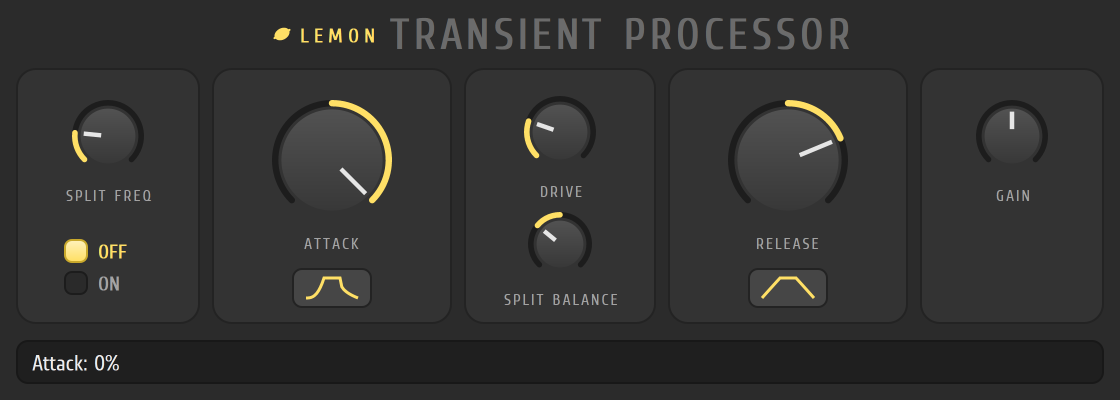
Make drums punchier
Section titled “Make drums punchier”- Put Lemon Transient Processor in an effect slot on a drum track in the mixer.
- Make sure the ON option in the first card is selected.
- Turn ATTACK to the right. Each hit starts louder and snappier.
- Turn RELEASE to the left to shorten the tails and tighten the loop.
- Click the small shape buttons under the knobs to change how sharp or slow the change is.
The controls
Section titled “The controls”| Control | What it does |
|---|---|
| SPLIT FREQ | Splits the sound at this frequency. Only the part above it is shaped |
| OFF and ON | Switch the processing off and on, for a quick comparison |
| ATTACK | Right makes attacks louder, left softens them |
| RELEASE | Right brings up the tails, left cuts them |
| Shape buttons | Under ATTACK and RELEASE: a click steps between Sharp, Mid and Slow |
| DRIVE | Adds a little soft saturation to the shaped part |
| SPLIT BALANCE | Turn left for the low part alone, and right for the shaped high part alone |
| GAIN | Output level |
- Set SPLIT FREQ around 200 Hz to keep the kick’s body untouched while its click is shaped.
- Switch between OFF and ON to check that you’re making it better, not just louder.