 Lemon wiki
Lemon Phaser
Lemon Phaser sweeps notches through a sound for a soft, swirling movement. It’s gentler than a flanger and works well on pads, electric pianos, guitars and hi-hats.
It’s built into Lemon Studio, and also comes as a VST3 and CLAP plugin for other DAWs.
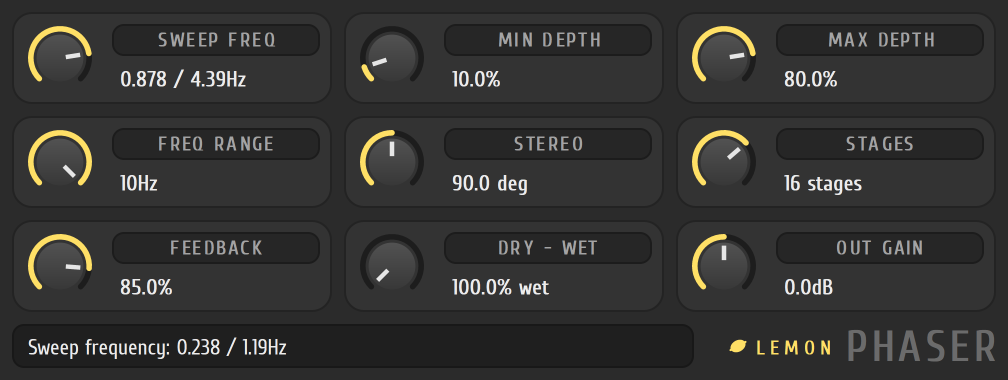
A slow swirl
Section titled “A slow swirl”- Put Lemon Phaser in an effect slot on the track in the mixer.
- Set STAGES to a middle value. More stages give more notches.
- Turn SWEEP FREQ down for a slow cycle.
- Set MIN DEPTH low and MAX DEPTH high to give the sweep a wide path.
- Set DRY - WET to taste, and raise FEEDBACK for a more pronounced, whistling sweep.
The tiles
Section titled “The tiles”Turn a tile by dragging anywhere on it.
| Tile | What it does |
|---|---|
| SWEEP FREQ | How fast the sweep cycles. The range is set by FREQ RANGE |
| MIN DEPTH, MAX DEPTH | The lowest and highest points of the sweep |
| FREQ RANGE | Switches the sweep speed between a slow (2 Hz) and a fast (10 Hz) range |
| STEREO | How far the right side’s sweep runs ahead of the left, up to half a cycle |
| STAGES | The number of notch stages |
| FEEDBACK | Feeds the output back in to deepen the notches |
| DRY - WET | The balance of the original and the phased sound |
| OUT GAIN | The output level |
- Use STEREO around the middle for a wide, rotating sound on a stereo pad.
- Lower OUT GAIN if a lot of FEEDBACK makes the effect louder than the original.