 Lemon wiki
Lemon Balance
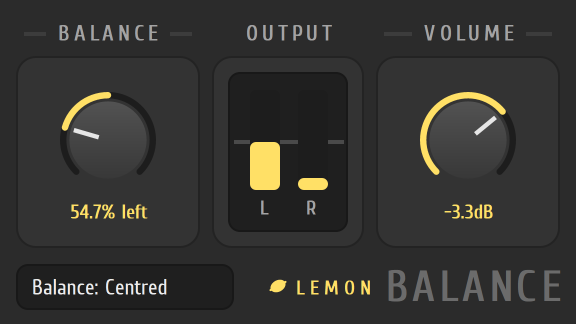
Lemon Balance does two small jobs: it shifts a sound toward the left or the right speaker, and it sets how loud the sound is. A pair of level bars shows what’s coming out of each side.
It’s built into Lemon Studio, and also comes as a VST3 and CLAP plugin for other DAWs.
Centre a lopsided sound
Section titled “Centre a lopsided sound”- Put Lemon Balance in an effect slot on a mixer track.
- Play the sound and look at the OUTPUT bars, L and R.
- If one side is louder, turn the BALANCE knob toward the quieter side until the bars match.
- Use the VOLUME knob to set the overall level.
The controls
Section titled “The controls”| Control | What it does |
|---|---|
| BALANCE | Left of centre favours the left side, right of centre the right. It reads Centred at the middle |
| OUTPUT | Two bars for the left and right levels |
| VOLUME | The overall level in dB |
- The knobs stop at the centre and at 0 dB, so it’s easy to return to neutral.
- To place a sound with more control over the width, try Lemon Stereo Shaper.