 Lemon wiki
Lemon Flanger
Lemon Flanger adds a very short, moving delay to a sound, which makes a sweeping, jet-like comb. Use it on drums, guitars and synths for movement, or at low settings for a gentle shimmer.
It’s built into Lemon Studio, and also comes as a VST3 and CLAP plugin for other DAWs.
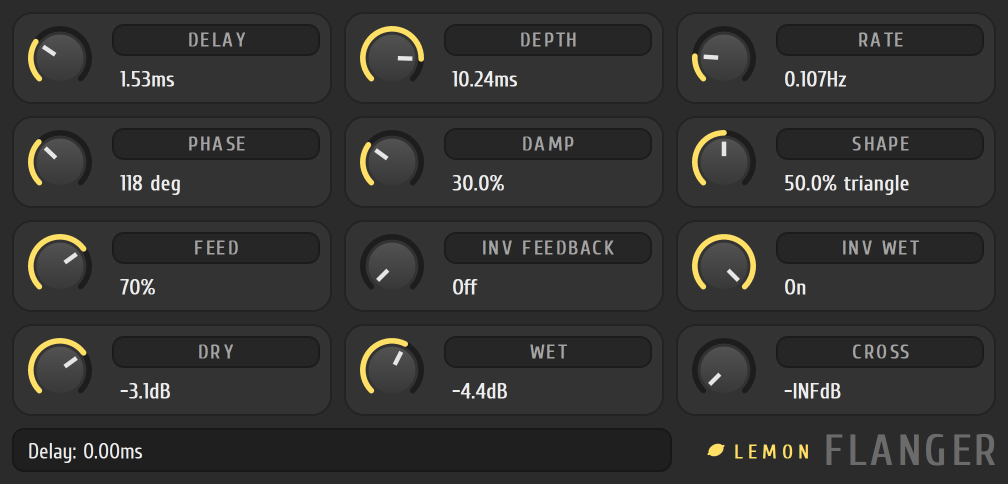
A slow sweep
Section titled “A slow sweep”- Put Lemon Flanger in an effect slot on the track in the mixer.
- Set DELAY low (about 2 ms) and DEPTH to about the same.
- Set RATE to a slow sweep, around 0.2 Hz.
- Raise FEED to hear the comb ring more strongly.
- Raise PHASE so the left and right sides sweep out of step for a wider sound.
The tiles
Section titled “The tiles”Turn a tile by dragging anywhere on it.
| Tile | What it does |
|---|---|
| DELAY, DEPTH | The short delay, and how far it swings |
| RATE | The speed of the sweep |
| PHASE | How far the right side’s sweep runs ahead of the left |
| DAMP | Darkens the fed-back sound |
| SHAPE | Blends the sweep from a sine to a triangle |
| FEED | How much of the sound is fed back. INV FEEDBACK flips its polarity |
| INV WET | Flips the polarity of the flanged sound |
| DRY, WET | The balance of the original and the flanged sound |
| CROSS | Mixes some of each side’s delayed sound into the other side |
- Turn on INV FEEDBACK or INV WET for a hollower, more metallic sweep.
- Keep DAMP up if the feedback sounds harsh.