 Lemon wiki
Lemon Sampler
Lemon Sampler plays one sample across the keyboard. Use it for one-shots, loops, vocal chops and anything recorded. It also comes as a VST3 and CLAP plugin for other DAWs.
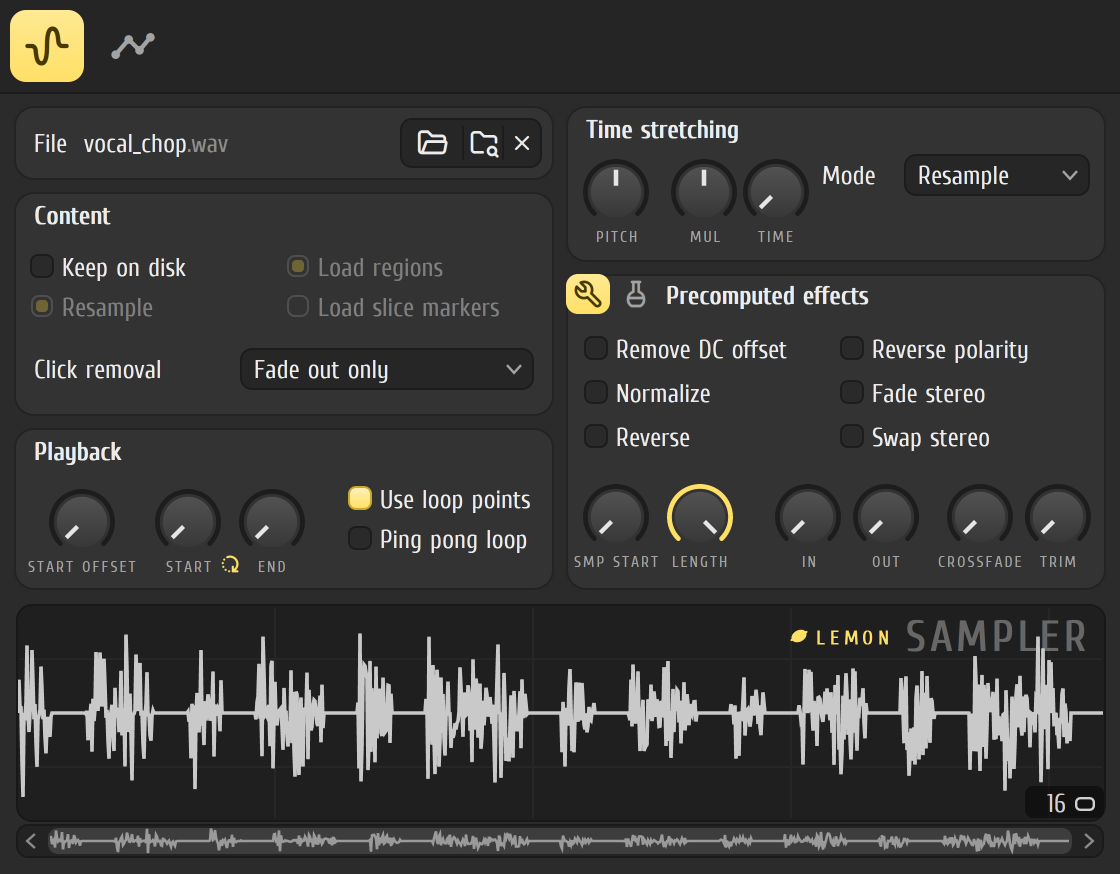
Get a sound quickly
Section titled “Get a sound quickly”- Drag a sample from the browser onto the instrument rack. It opens in Lemon Sampler. You can also add it from the ADD menu and click the folder button next to File.
- Play it with your computer keyboard (Ctrl+T switches it on) or draw notes in the piano roll.
- Right-click a key on the keyboard under the waveform to choose the root note, the key that plays the sample at its original pitch.
- Open the second tab and click Volume to shape the note with an envelope.
The sample tab
Section titled “The sample tab”- File: the folder button loads a sample, the button beside it finds the sample in the browser, and the cross removes it.
- Playback: START OFFSET skips the start of the sample. START and END set the loop points, which you can also drag on the waveform. Switch on Use loop points to loop, and Ping pong loop to play the loop forwards and then backwards.
- Click removal: a list of ways to avoid a click when a note stops.
- Time stretching: PITCH shifts the pitch by up to an octave either way, MUL stretches the sample from a quarter of its length to four times it, and TIME stretches it to fit a length in beats. The Mode list chooses how the sample is stretched. Auto picks one for you and writes which under the list.
- Precomputed effects: these change the sample itself, once, before it plays. The first page has tools: remove DC offset, normalize, reverse, reverse polarity, fade from left to right, swap the channels, set where the sample starts and ends, fade in and out, crossfade the loop and trim silence. The second page has effects: gain boost with a clip switch, an equalizer, ring modulation, a filter, reverb and a stereo delay.
Envelopes and LFOs
Section titled “Envelopes and LFOs”The second tab has five targets across the top: Panning, Volume, Mod A, Mod B and Pitch. Each has an envelope (delay, attack, hold, decay, sustain and release, with tension knobs for the curves) and an LFO with a sine, triangle or pulse shape. The panning target has an LFO only. Mod A and Mod B drive the filter on the right, which has a choice of types.
At the bottom, Enable main pitch decides whether the instrument’s own pitch setting affects the sample, and Fine tune nudges the tuning in cents.
Long samples from disk
Section titled “Long samples from disk”Switch on Keep on disk and the sampler streams the file while it plays instead of holding all of it in memory. A file of 30 seconds or more switches it on for you. It works for uncompressed WAV and AIFF files played as they are. A sample you reverse or stretch stays in memory instead. The waveform’s readout says whether the sample is “in RAM” or “on disk”.
Good to know
Section titled “Good to know”- Some options on the sample tab are greyed out and do nothing yet: the Resample switch under Content, Load regions, Load slice markers, and the envelope presets menu.
Related
Section titled “Related”- Instrument rack
- Piano roll
- Browser
- Lemon Slicer, for cutting a loop into slices
- Lemon Drum Sampler, for kits
- Tesla, to edit the sample itself