 Lemon wiki
Lemon Stereo Shaper
Lemon Stereo Shaper lets you decide exactly how much of each input reaches each output. With four faders you can swap channels, collapse to mono, widen, or pour part of one side into the other. A delay and a phase shift can come before or after the mix.
It’s built into Lemon Studio, and also comes as a VST3 and CLAP plugin for other DAWs.
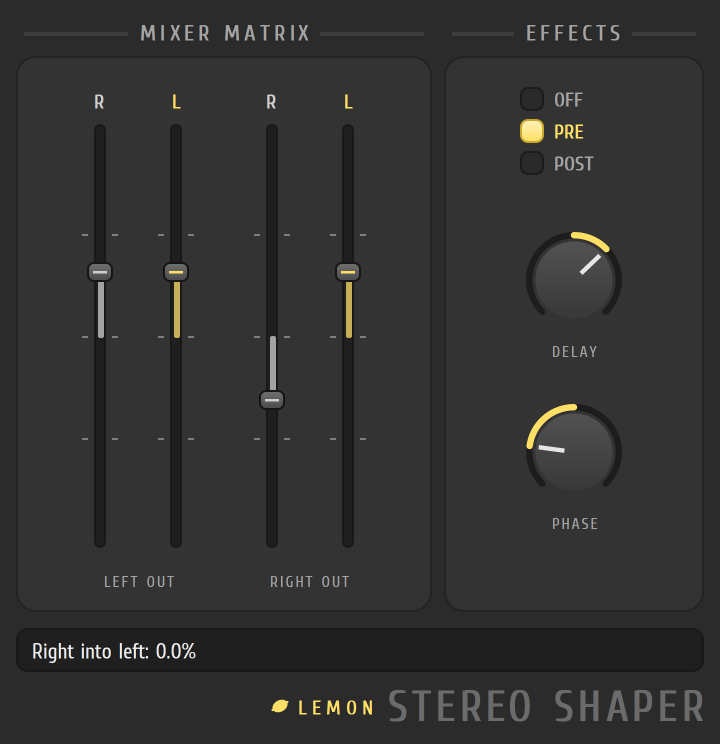
Make a sound mono
Section titled “Make a sound mono”- Put Lemon Stereo Shaper in an effect slot on a mixer track.
- In the MIXER MATRIX card, the four faders are the amounts that reach each output. The two under LEFT OUT carry the left and right inputs into the left output, and the two under RIGHT OUT carry them into the right output.
- Set each of the four faders to 50 percent, halfway between the middle mark and the top mark. The value shows in the status text as you drag.
- Both outputs now carry the same sound, a mix of the left and right inputs.
The controls
Section titled “The controls”| Control | What it does |
|---|---|
| Faders R and L under LEFT OUT | How much of the right and the left input go into the left output |
| Faders L and R under RIGHT OUT | How much of the left and the right input go into the right output |
| EFFECTS: OFF, PRE, POST | Whether the delay and phase work before the matrix, after it, or not at all |
| DELAY | Delays one side against the other, left or right |
| PHASE | Shifts the phase of one side, left or right |
Faders run from -100 to +100 percent. A negative value flips the polarity.
- Swap the sides by turning the two straight-through faders (the left input into the left output, and the right into the right) to 0 and the two cross faders to 100 percent.
- The faders stop at their standard values, so it’s easy to return to neutral: straight through at 100 percent, the crossing faders at 0.