 Lemon wiki
Lemon Vocoder
Lemon Vocoder makes one sound speak with the shape of another. It listens to a voice (the modulator) and uses its changing loudness, band by band, to shape a second sound such as a synth chord (the carrier). The classic result is a talking synth.
It’s built into Lemon Studio, and also comes as a VST3 and CLAP plugin for other DAWs. In other DAWs, the carrier goes into the plugin’s sidechain input.
Set up the sidechain
Section titled “Set up the sidechain”The vocoder needs two sounds at once. By default, the voice is the sound on the track the vocoder sits on, and the synth comes in from another track.
- Put your voice on a mixer track and add Lemon Vocoder to one of its effect slots.
- Play your synth on a different track.
- Route the synth track into the voice track as a sidechain: use Sidechain to this track on the route arrow, or Track routing ▸ Sidechain selected tracks to this track. The versions ending in only also stop the synth track playing to the Master by itself.
- In the vocoder’s INPUTS card, check that MOD reads Own track and CAR reads Input 1. Inputs count the tracks routed into this one, starting at 1.
- Play both. You should hear the synth following the voice. Turn WET up if it’s quiet.
Changing the INPUTS knobs in the editor only reroutes the tracks after you save the project and open it again. Set them before you build the rest of the track, or save and reopen after changing them.
You can also swap the roles: set MOD to Input 1 and CAR to Own track if the synth is on the vocoder’s track and the voice comes in on the sidechain.
If you only have one stereo sound, switch the L/R card ON. The left channel is then the modulator and the right channel is the carrier.
The cards
Section titled “The cards”| Card | Controls |
|---|---|
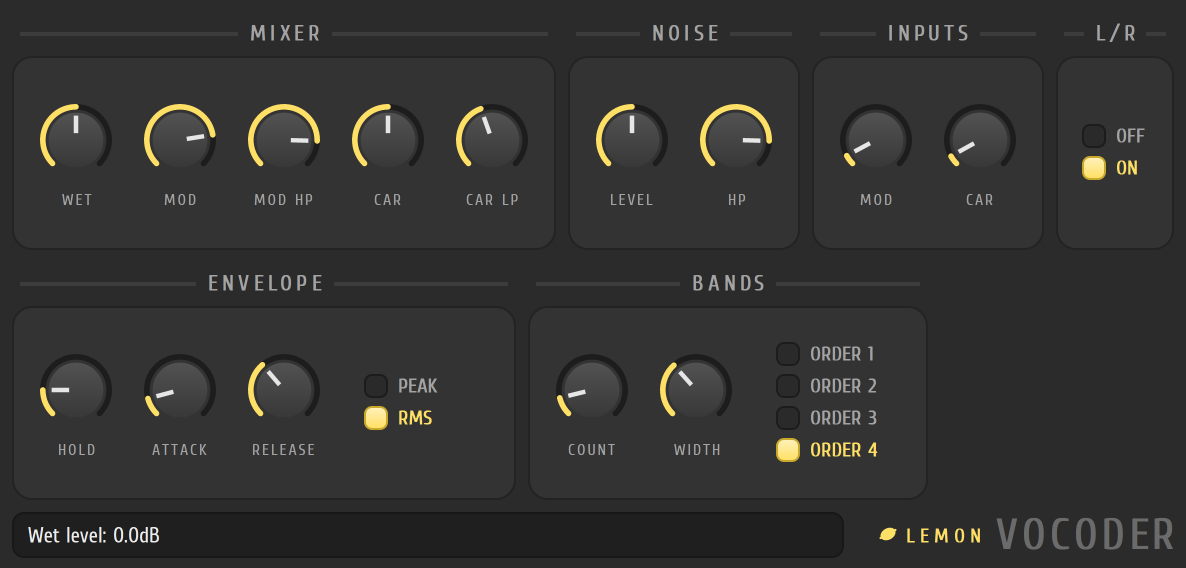
| MIXER | WET is the vocoded level. MOD mixes in some of the original voice, through the high-pass filter MOD HP. CAR mixes in some of the carrier, through the low-pass filter CAR LP |
| NOISE | LEVEL adds noise to the carrier, with a high-pass filter HP, for a breathy, hissy top |
| INPUTS | MOD and CAR: which tracks supply the voice and the carrier |
| L/R | Takes the voice and carrier from the left and right of one stereo signal |
| ENVELOPE | HOLD, ATTACK and RELEASE set how quickly each band follows the voice. PEAK or RMS picks how the level is read |
| BANDS | COUNT (more bands are clearer), WIDTH (how much neighbouring bands overlap) and ORDER (how steep each band is) |
There’s no built-in synth in the vocoder, so a carrier that’s set to none is silent. Use another track for the carrier.
- Use a carrier with a lot of harmonics, such as a saw chord, so there’s something for the bands to shape.
- Raise COUNT for words you can understand, and lower it for a more robotic sound.
- Add a little NOISE and raise MOD slightly if the words don’t cut through.
Related
Section titled “Related”- Mixer
- Lemon Trio, a good source for a carrier
- Lemon Filter
- Plugins